Upstage Products Evaluation — In-the-wild 2: Exam Auto-grader (Information Extract × Solar-pro3)
In-the-wild 2 / Information Extract × Solar-pro3 — an end-to-end document task.
What I tested & how
The second end-to-end experiment: an auto-grader for a TOEIC mock exam I filled in by hand. The pipeline is photo → Information Extract reads the answers → a script grades them against the key. Reading is IE’s job (the only Upstage path that takes image input); grading is deterministic exact-match, so any error is traceable to the extraction stage.
What I varied and checked:
- Extraction mode — IE
defaultvs.enhanced: which one actually reads the handwriting, and by how much? - Grading correctness — I graded the same sheet by hand and compared question by question (confusion matrix / F1), to see whether extraction errors propagate into grading errors.
-
confidenceflag — is the low-confidence signal usable for routing borderline answers to human review?
Setup
- Pipeline
answer table (jpg) ──[IE]──▶ answer key {1..100 : A/B/C/D} │ TOEIC answer sheet, 6 pp ──[IE, enhanced]──▶ student answers {32..94} (photos) │ ▼ [grading script] student answers ↔ answer key, exact match ▼ score + list of wrong answers- Reading is fixed to IE (IE is the only vision path that takes image input). Grading is exact-match, so no model is needed and it’s deterministic.
- Implementation:
code/grade_quiz.py(multiple images/PDFs → IE extraction → rule-based grading, cached).
- Dataset:

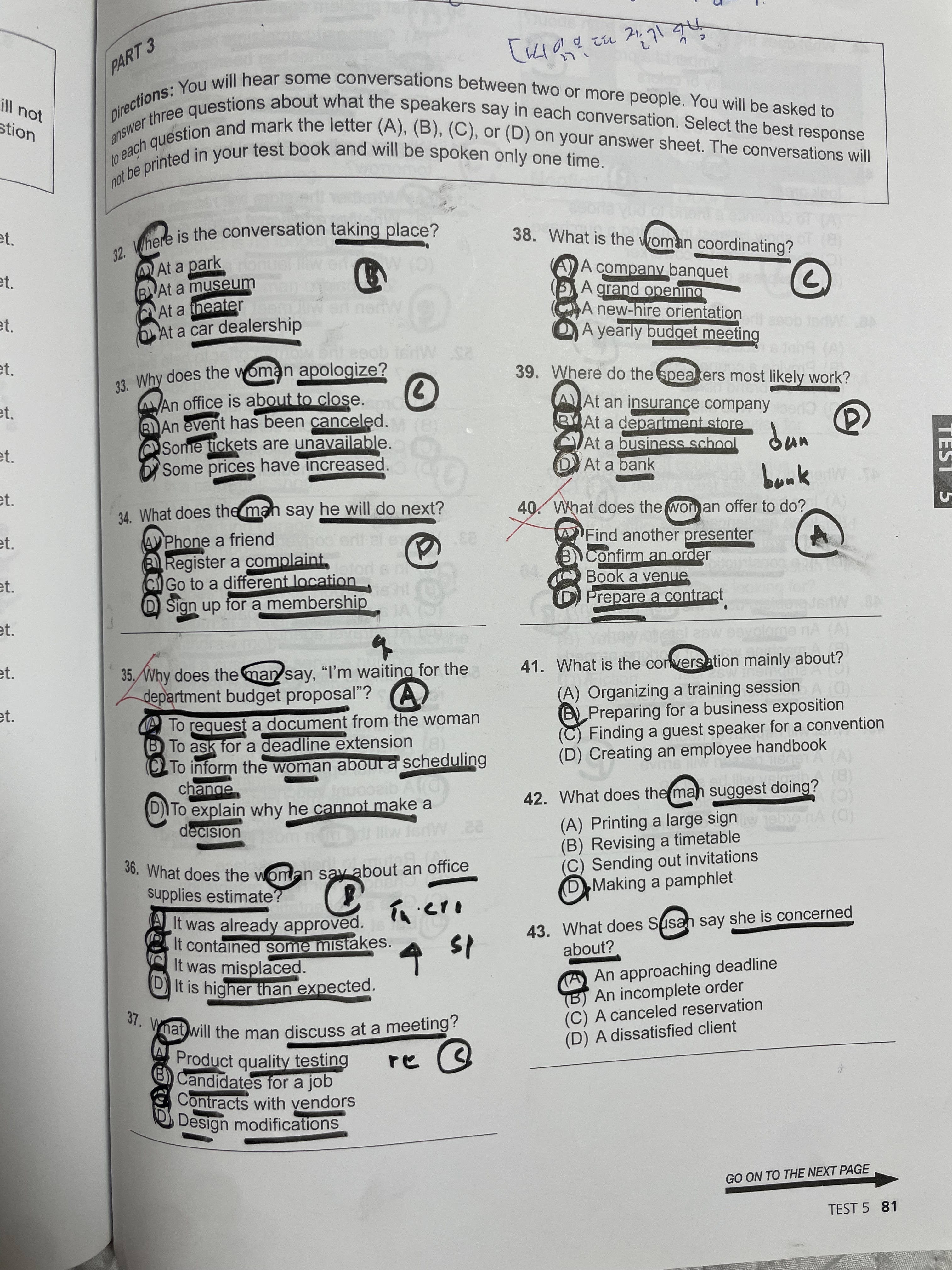
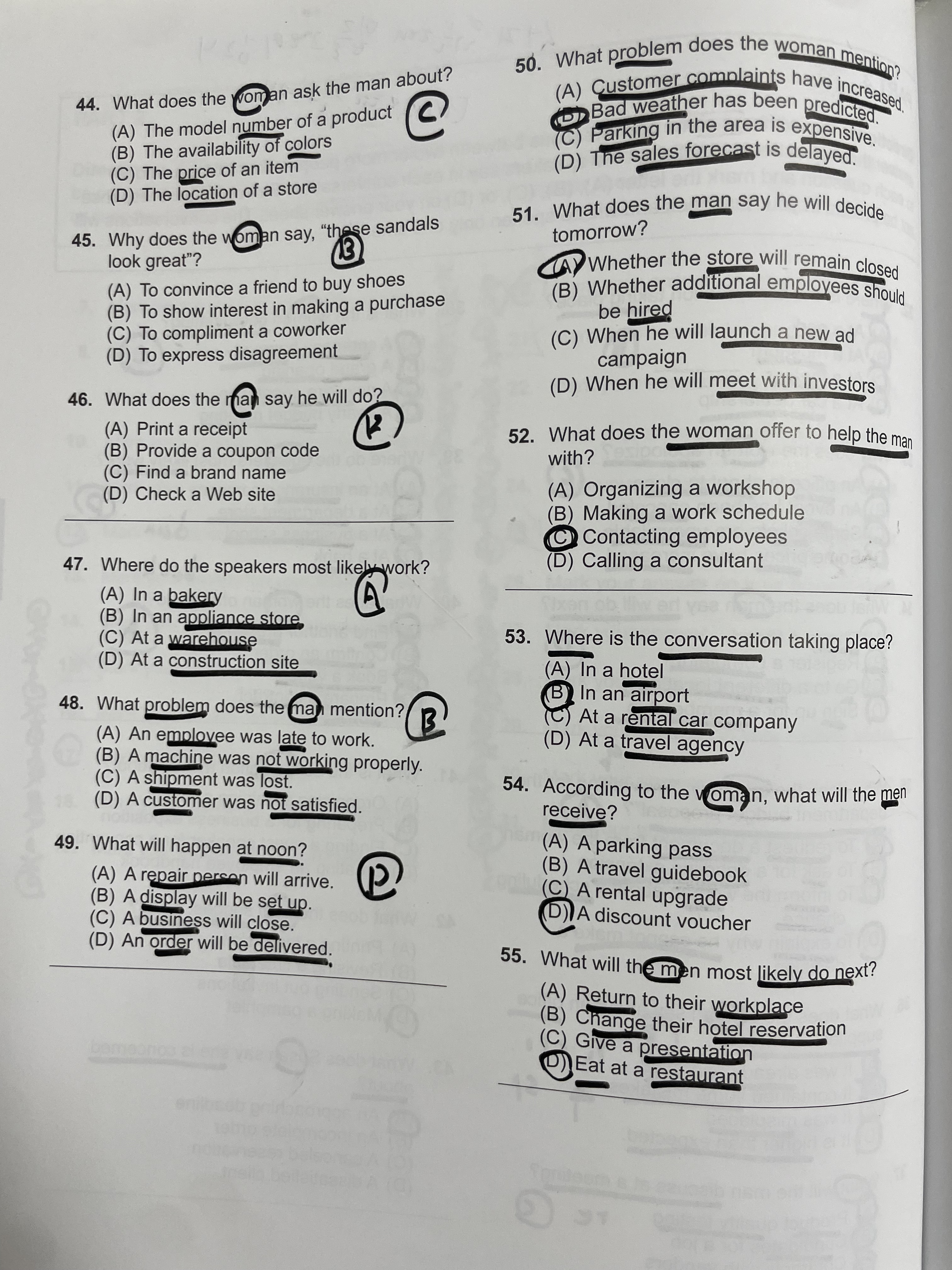
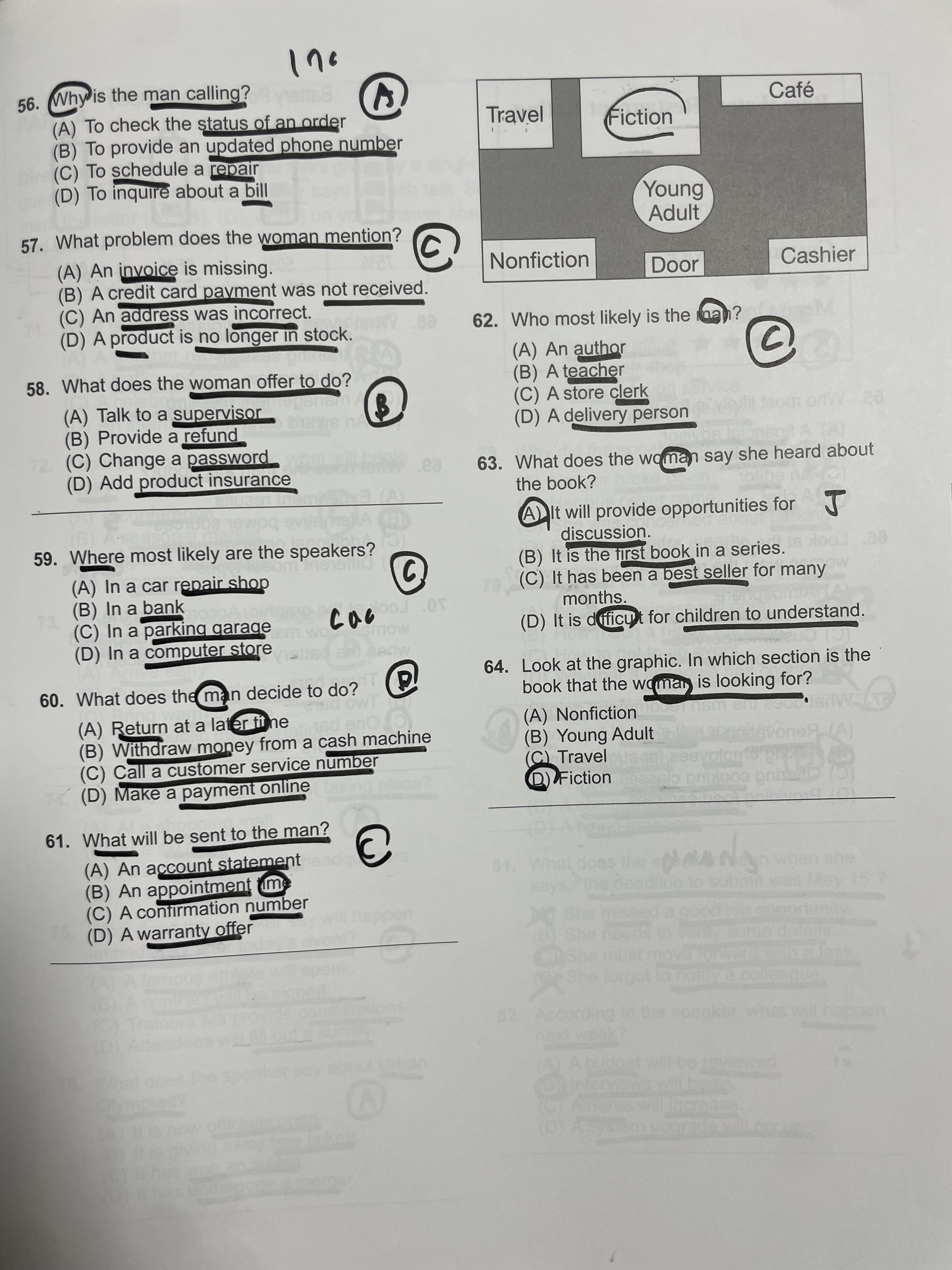
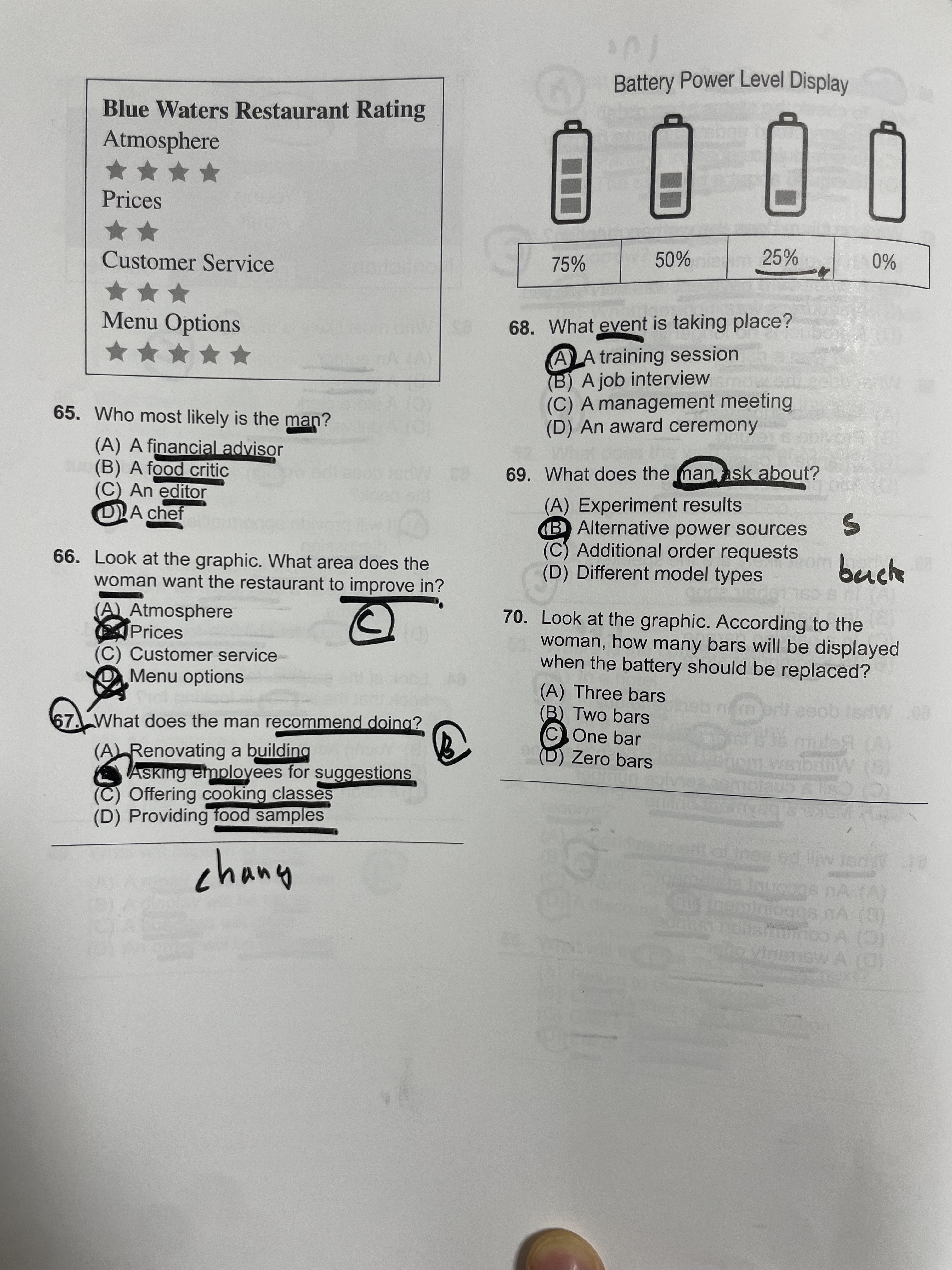
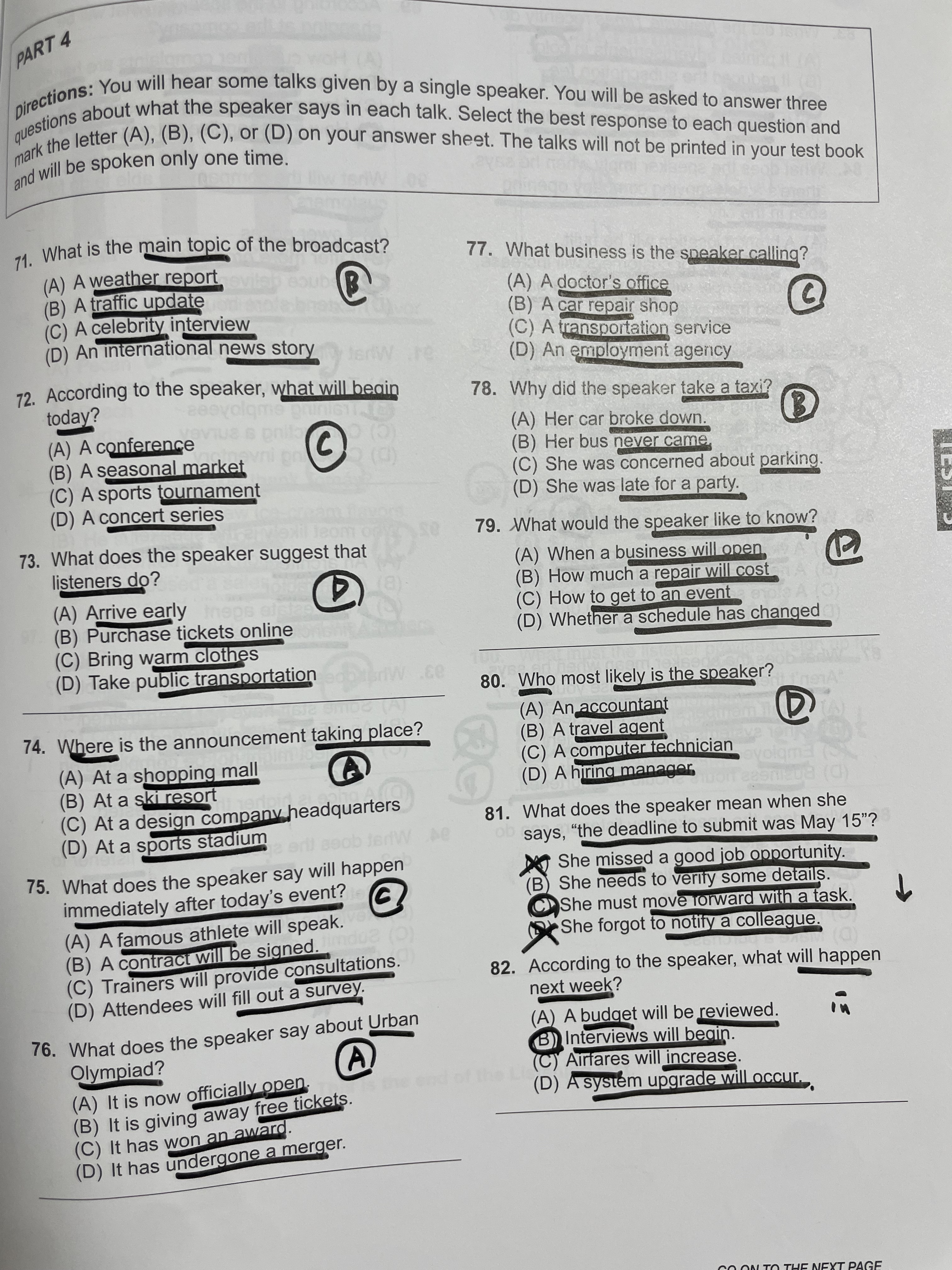
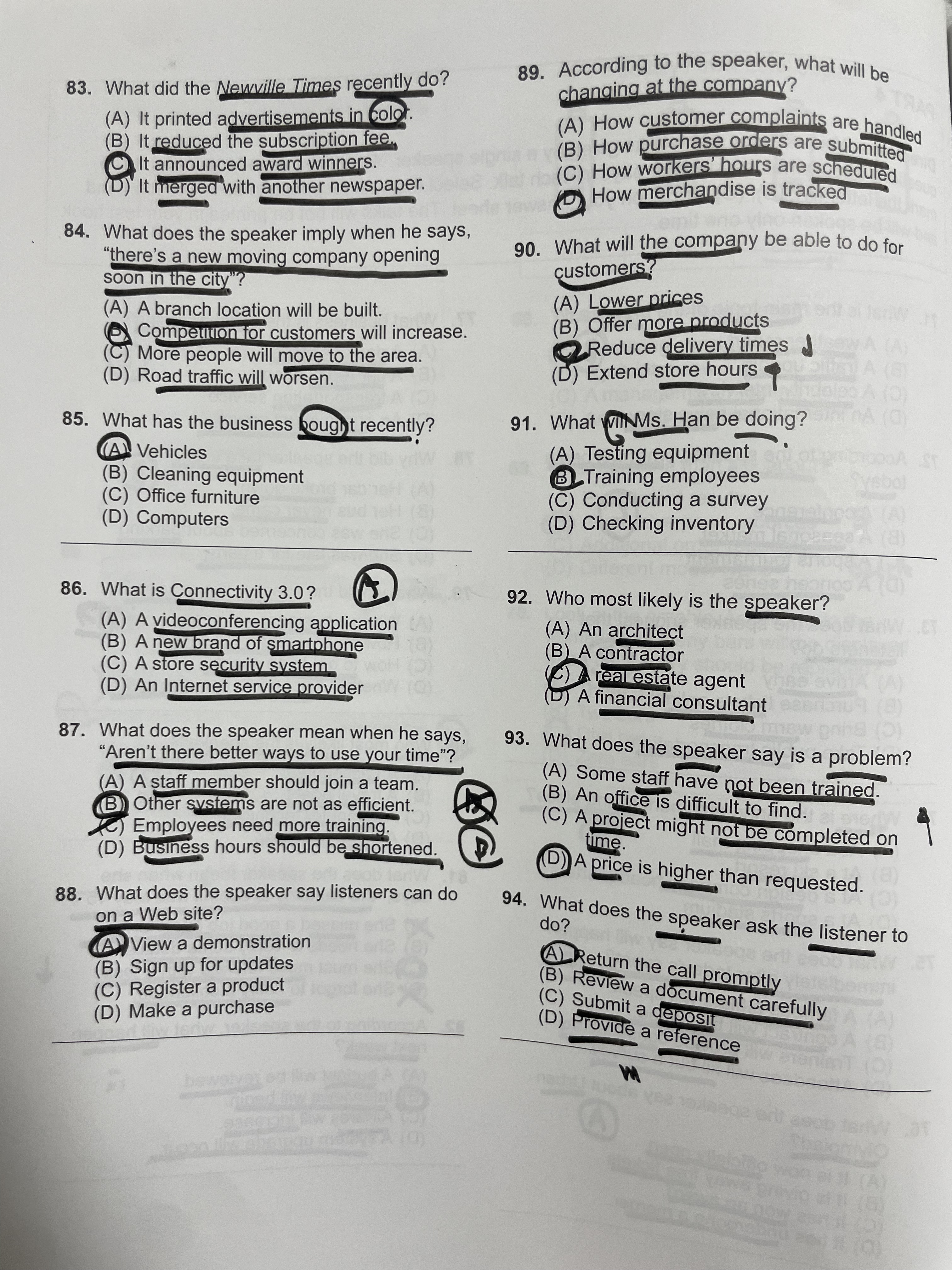
- Student answers, **6 pages** ([p1](../data/my_quiz/IMG_6649.jpg) · [p2](../data/my_quiz/IMG_6650.jpg) · [p3](../data/my_quiz/IMG_6651.jpg) · [p4](../data/my_quiz/IMG_6652.jpg) · [p5](../data/my_quiz/IMG_6653.jpg) · [p6](../data/my_quiz/IMG_6654.jpg), questions 32–94, options marked by hand + circles).
- Where the [IE experiment](https://jihyuk-byun.github.io/blog/2026/upstage-eval-info-extract/) was about extracting *printed text fields*, this one is about extracting ***handwritten, irregular marks*** (handwritten letters, circled options, with placement all over the place).
- Answer key: [answer_key.json](../data/my_quiz/answer_key.json) - **Extraction:** `information-extract`, shared `ANSWER_DESC`, `mode` = default vs. **enhanced**. - **Outputs:**
- `results/my_quiz_graded.json`: result
- `results/my_quiz_grade_table.md`: ablation table
- `results/my_quiz_grading_accuracy.json`: accuracy table - **Prompt used (IE field `description` = shared `ANSWER_DESC`):** ``` The student's chosen answer for this question, marked BY HAND as a single letter (A, B, C, or D). It is usually a handwritten letter that is CIRCLED, placed either next to one of the (a)(b)(c)(d) options or in the right margin of that question's row. Decision rules: if a letter is both written and circled, use it; if several marks appear, use the clearest circled one; if there is NO handwritten mark at all, treat it as unanswered (empty). ```   - The grading stage is **rule-based (exact match against the answer key)** — no prompt. (The same `ANSWER_DESC` was also shared with a Solar-grading experiment.)
Result
Answer extraction → grading (63 student answers). “Extracted” = number of questions read as non-empty; “Score” = number matching the answer key.
| Setting | Score | Extracted (read) | Total | | :——————- | :—-: | :——–: | :-: | | IE default mode | 19 | 35 | 63 | | IE enhanced mode | 60 | 63 | 63 | | Actual (human grading) | 61 | - | 63 | I’d hoped to compare against an end-to-end setting using Solar, but it doesn’t support visual input yet.
The enhanced mode decides the outcome.
- enhanced reads all 63 questions (0 missed) and scores 60, close to the human score (61).
- default reads only 35 (28 missed), so its score (19) is essentially meaningless.
- Comparing question-by-question correctness, it agrees with human grading on 62/63 (enhanced).
- default changes its extraction run to run — the above is a single measurement.
Analysis of the 3 questions marked wrong:
| Q | Key | Student actual | IE read | Cause |
|---|---|---|---|---|
| 36 | D | B | B | student’s mistake (graded correctly). A hard-negative B written like a D, but IE read it correctly |
| 46 | D | B | B | student’s mistake (graded correctly) |
| 81 | C | C | B | IE misread — the circle drawn directly on an option went unrecognized → 1 grading error |
Of the 3 marked wrong, 2 are graded correctly and only 1 is a real error. Q36·46 are answers the student actually got wrong; only Q81 is a case where IE misread the circle and the grading went off.
(4) Grader performance — confusion matrix · F1 (enhanced, 63 questions; positive = “graded as correct”):
| Prediction: Positive | Prediction: Negative | |
|---|---|---|
| Actual: True | TP 60 | FP 0 |
| Actual: False | FN 1 (Q81) | TN 2 (Q36·46) |
It never once accepted a wrong answer as correct (FP 0).
- Precision 1.000 · Recall 0.984 · F1 0.992.
- The only error is Q81 — treating a correct answer as wrong (IE misread).
- Viewed as wrong-answer detection, processing one correct answer as wrong drops F1 to 0.800.
(5) confidence: true low-confidence flag (enhanced, 63 questions): Confidence doesn’t miss the misread, but it’s too coarse to be useful.
- The format is not a score, just a two-level
high/lowflag. - 33 are low (52%) — the misread Q81 is flagged low, but every ambiguous bit of handwriting is also low, so half become review candidates.
- A “human reviews anything low” rule doesn’t miss Q81, but you’d re-check half of the 63 questions. (
results/my_quiz_confidence.json)
Finding
- Bottom line:
- “photo → IE → grading script” almost auto-grades TOEIC — F1 0.992 · Accuracy 0.984.
-
enhanced modevs.default mode:- default is basically unusable, with ~40% unread.
- enhanced has 0 missed, 60/63.
- Where the IE experiment extracted printed text fields, this one extracts handwritten, irregular marks (handwritten letters, circled options, placement all over the place) — at this difficulty default IE falls short (~40% unread), so enhanced is necessary.
- Choosing the mode matters more than tuning the prompt (at extra cost).
- It reads hard-negative handwriting well:
- Q36·46, where B was written to look like D, were still recognized as intended.
- The one failure = marking “style coverage”:
- Q81 is a circle drawn directly on an option.
ANSWER_DESCis centered on “handwritten letter / margin,” so it covers that style less → the extraction instruction has to cover every marking style. - It seems weak at multi-type information extraction for a cleaner experiment I’d compare against single-type IE, but skipped it for budget reasons.
- Q81 is a circle drawn directly on an option.
- Confidence score:
- the “low” confidence flag doesn’t miss the misread Q81, but a binary score can’t separate “ambiguous” from “misread.”
- as a basis for human review, its usability is low.
- Practical application:
- the (printed) answer key is perfect, and handwritten answers reach 95% with enhanced → repeatable grading automation is feasible.
- Realistically, three things look like bottlenecks:
- ① enhanced cost
- but at 1.5× default (0.06 $/page), it’s a perfectly reasonable cost.
- ② a single description vs. the diversity of marking styles — e.g. running several models off one description.
- needs more experiments.
- ③ human review of the 1–2 borderline questions
- if 100% isn’t achievable, how about returning confidence as a scalar score (not binary) so it can be thresholded?
- ① enhanced cost
Appendix — Code · Dataset
Code (single notebook): exp4_quiz_grader.ipynb
- Grading implementation:
code/grade_quiz.py· shared module:code/upstage_eval.py.
Dataset (my 6-page answer sheet + answer key) — download: IMG_6649.jpg IMG_6650.jpg IMG_6651.jpg IMG_6652.jpg IMG_6653.jpg IMG_6654.jpg answer_key.json
- Result:
results/my_quiz_graded.json
Enjoy Reading This Article?
Here are some more articles you might like to read next: